
Check out our product updates and new features in 2025.
In This Update:
2025 Xero App Awards

Oncord has been named New Zealand Small Business App of the Year at the 2025 Xero App Awards. We appreciate the Xero community and all the businesses who use and recommend Oncord. This recognition reflects the ongoing support and feedback that help us continue improving the platform.
Oncord AI Assistant Has Launched

Oncord’s page editor now has an AI-powered assistant, designed to support faster content creation and more efficient editing. The assistant is available via the AI icon in the left-hand toolbar.
We've also added AI to our help centre, improved AI design generation, added SEO keyword generation, and added AI tools for developers.
- AI Page Assistant: Generate, rewrite, translate, and proofread content directly in the editor. With Chat Mode, describe layout or style changes in plain language, and the assistant applies them automatically for a faster editing experience.
- AI Help in the Knowledge Base: Ask a question and get instant answers. The AI assistant suggests relevant tutorials and articles, or you can choose “Answer Question with AI” for contextual, direct solutions.
- Updated Design Wizard: Leveraging AI to generate website templates that are faster to build and more precise in matching your needs.
- Keyword & Description Generation: Generating SEO-friendly meta descriptions and keywords with a single click.
- AI Tools for Developers: Refactor code with chat, autocomplete full code blocks, or instantly understand what a snippet does with Explain Code.
Read our blog article for full details:
Events Module Improvements
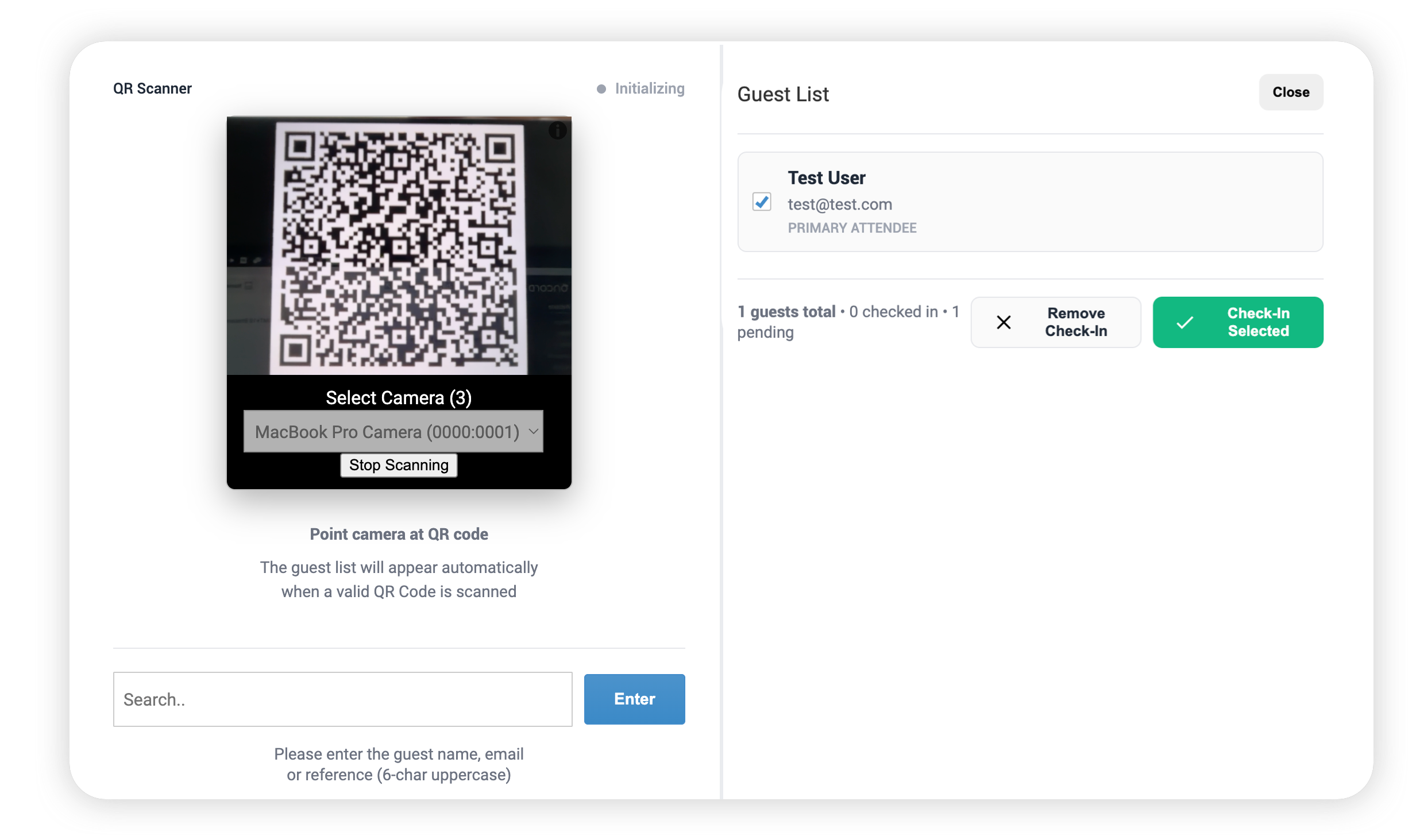
New Front Desk Check In Interface
A new Front Desk interface is now available for event attendee check in. Attendees can be quickly looked up using a QR scanner or by
searching their reference, name, or email. Once found, the guest list is displayed, allowing attendees to be easily checked in or have their
check in removed with a single selection.
Check out our help article for more details: Checking
in Event Attendees.
Expanded Configuration Options
RSVP handling is now more flexible, making it easier to manage different attendee scenarios while keeping the registration process simple.
-
Anonymous Guests: Guest fields are optional and can be left blank to allow anonymous guests. If name fields are provided,
the guest can still be registered as a new contact.
-
Alternate Attendee: Alternate Attendee selection is now available for all registrations, not just invited guests.
- Additional Guests: Existing registrations can now include additional guests for greater flexibility.
Check out our help article for more details: Checking
in Event Attendees.
Suppress Reminders and Automations:
You can now choose to suppress reminders and event automations when adding specific attendees. This gives you more control over event
communications and helps prevent unnecessary notifications from being sent.
Expanded Nametags Printing Options
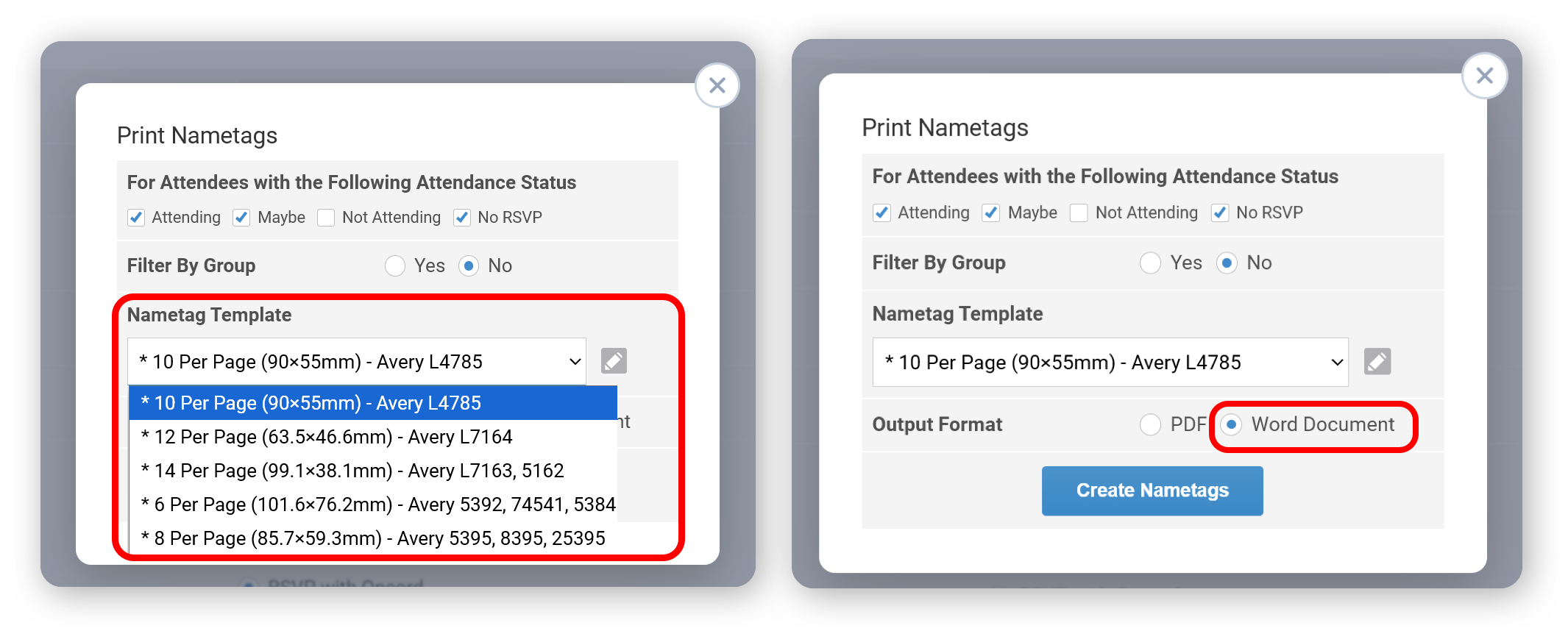
The Events module now includes a full range of common printed sizes for Nametag Templates.
These templates make it easier for users to produce nametags that fit popular ez sticky nametags or standard sticky label sheets.
It now also supports exporting directly to Word for more flexible printing and layout adjustments.
Check Event Attendees have Paid
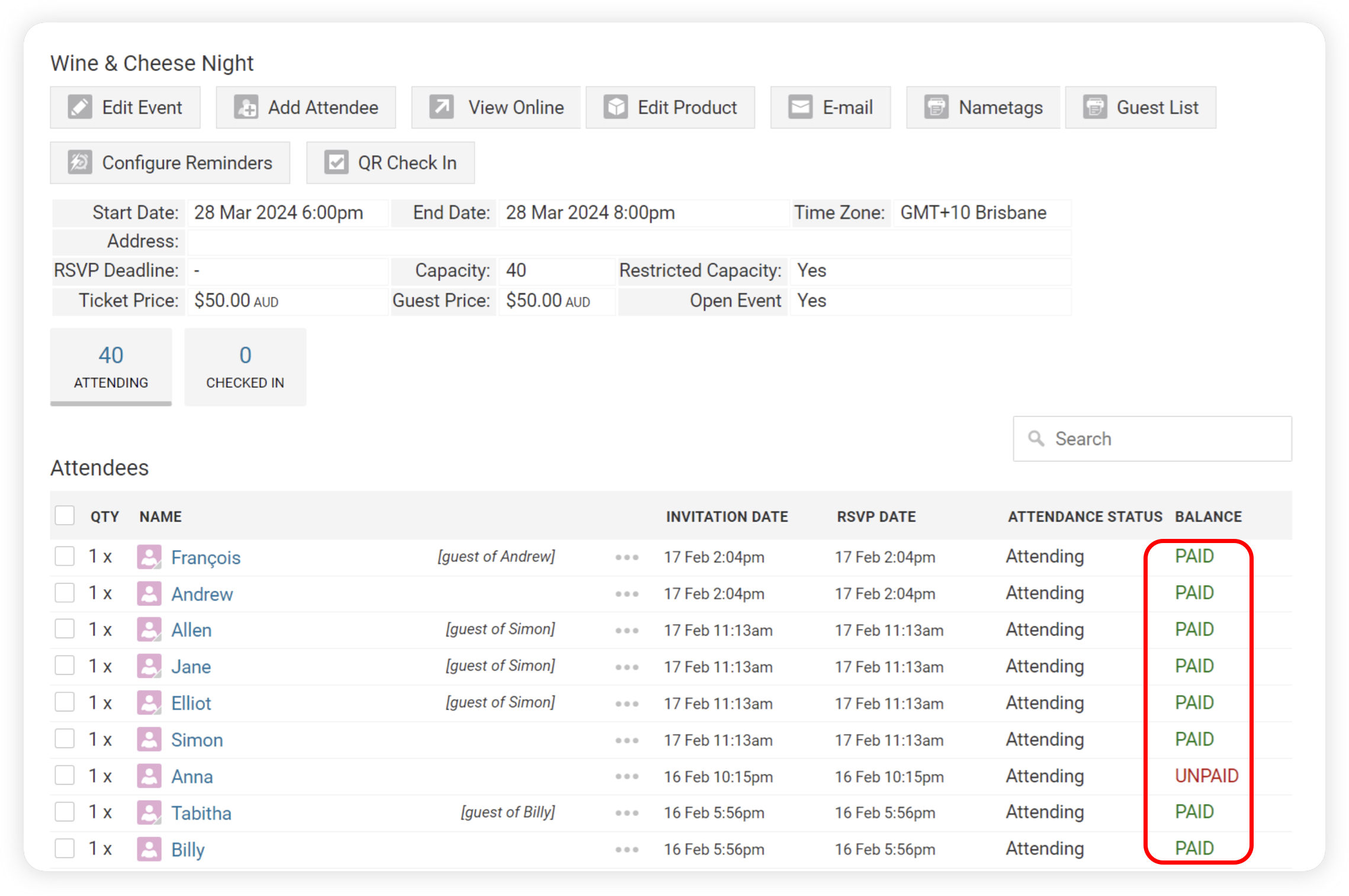
A balance column has been added when viewing Attendees of Paid Events, so that before an event you can view whether anyone hasn't paid yet (if you're offering bank transfer as a payment method).
Website Builder & Design Experience
The page editor has seen major visual and usability improvements, empowering designers to create more polished and flexible layouts.
Layout Dividers
The page editor now includes Layout Dividers, decorative SVG shapes like waves, curves, and angles that create smooth
transitions between sections. They’re fully customizable and make pages more dynamic and visually cohesive.
Updated Analytics Dashboard
The analytics dashboard has been refreshed with a cleaner, easier-to-read layout and added comparison metrics to help you better understand traffic performance over time. You can also enable Analytics Email Reports to receive selected metrics automatically on a daily, weekly, or monthly schedule.
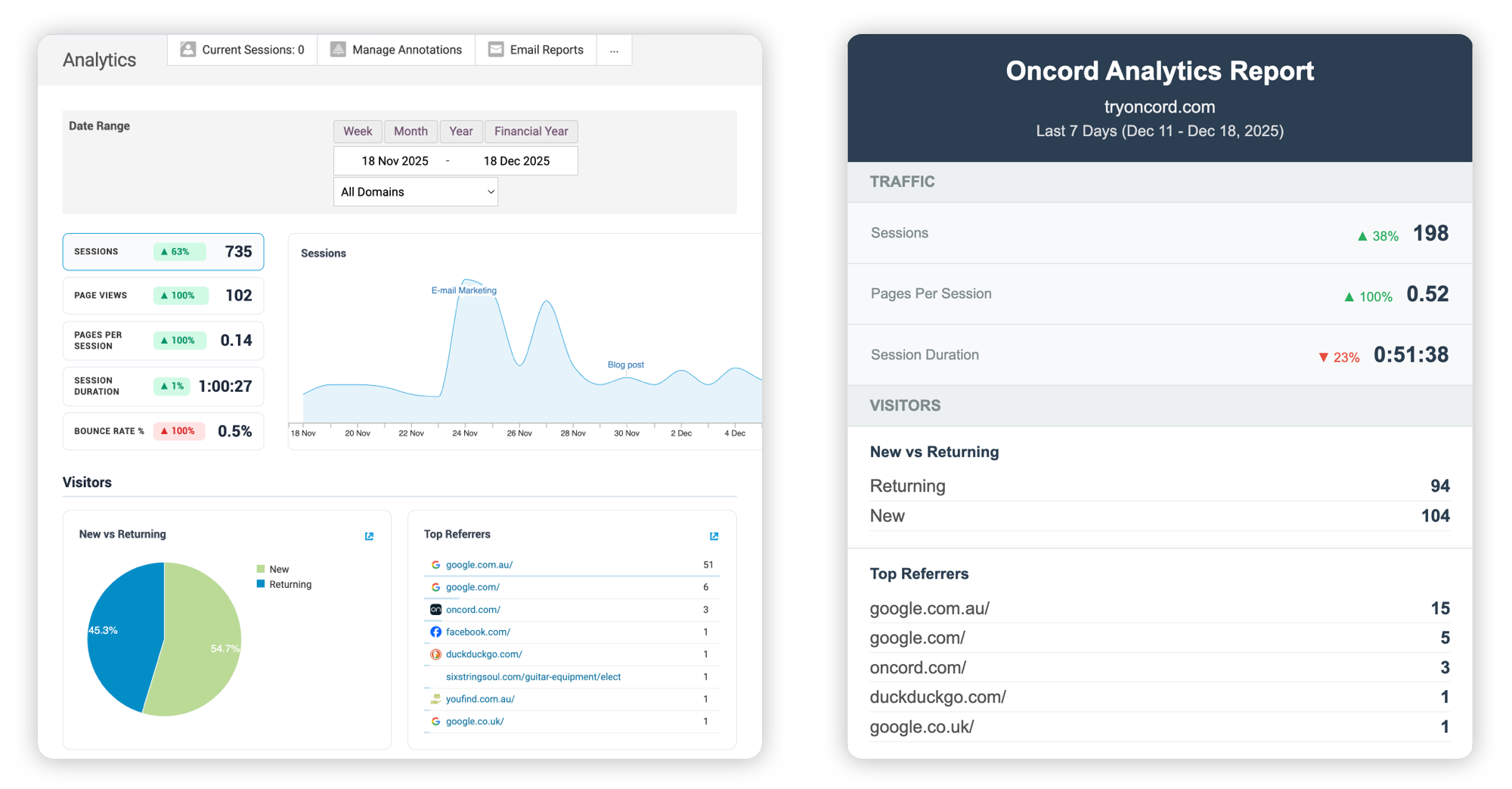
Additional analytics improvements include:
- A new Trend Dialog for clearer insight into performance changes.
- UTM tag parsing from URLs for more accurate campaign tracking.
- AI chat platform detection to better understand traffic sources.
- Paid vs organic traffic detection for clearer attribution.
- Improved hover descriptions on metrics for added clarity and context.
Toolbar & Editor Refresh
A redesigned toolbar now offers a unified experience across desktop, mobile, and inline editors. Tools are grouped into collapsible areas,
making everything easier to find and use.

Image Crop Positioning and Background Controls
You can now adjust how an image is positioned within its frame after cropping, giving you more control to highlight specific areas. The same
adjustment options are also available for section background images.
New Download Option in Image Picker
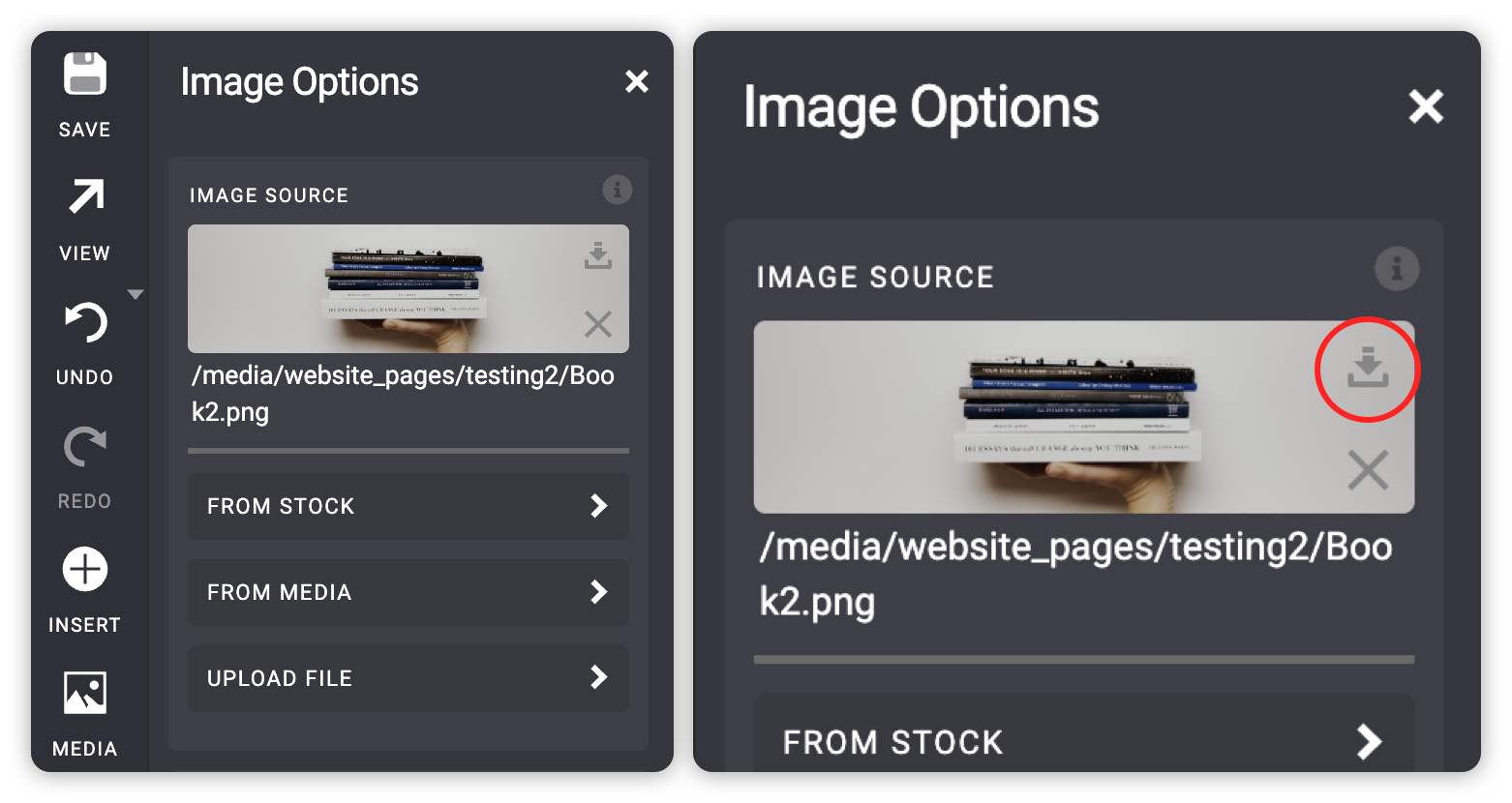
The image picker now includes a button to download the selected image straight away, rather than having to find it to download, modify, and
reupload.
New Section Background Sizing Options
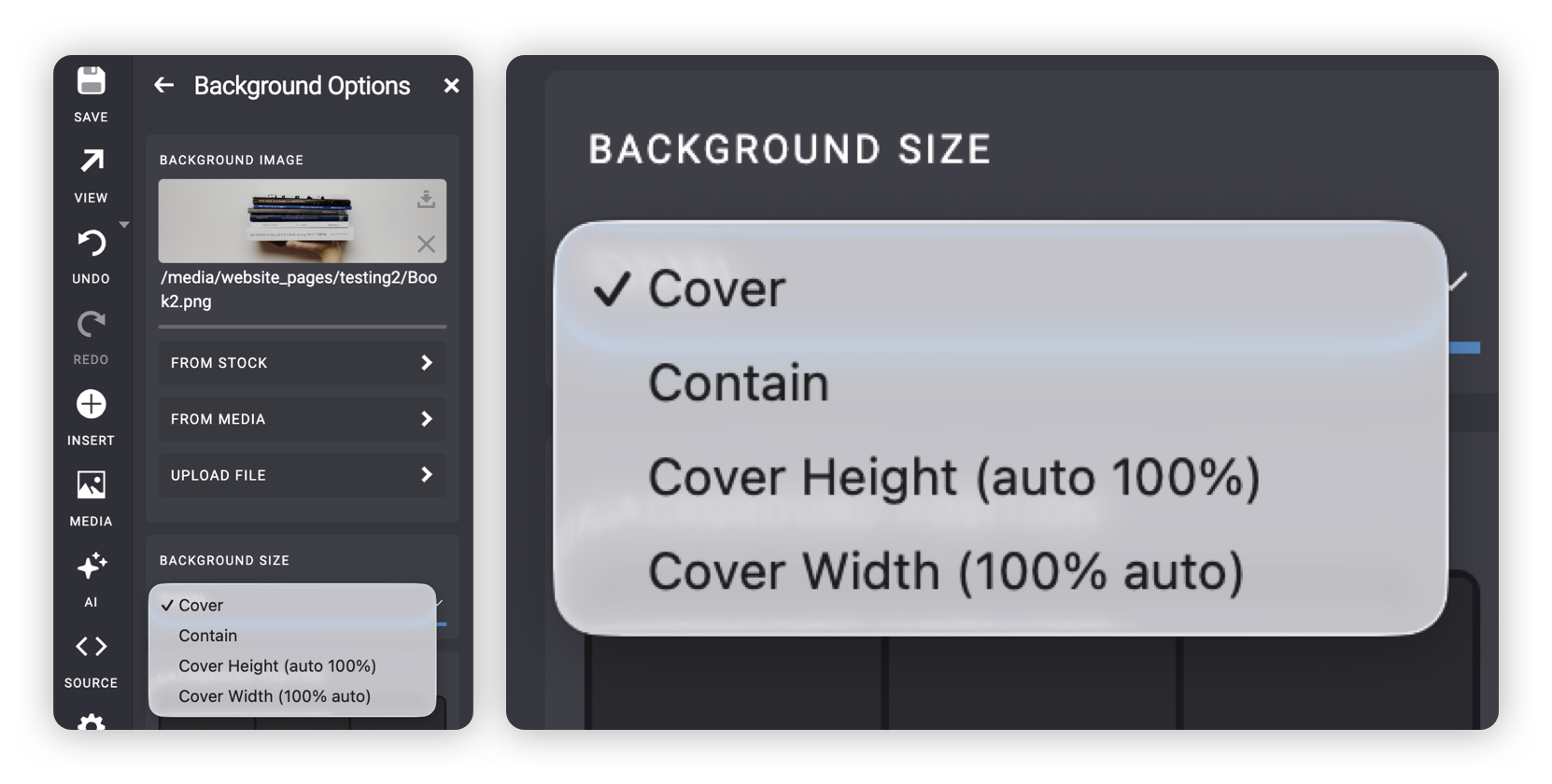
We’ve added more control over how section background images are displayed. You can now choose from several sizing options to better fit different layouts and screen sizes.
- Cover: keeps the image large enough to fill the entire section.
- Contain: scales the image, so the whole image is visible without cropping.
- Cover Height: adjusts the image to fill the section’s height while maintaining aspect ratio.
- Cover Width: adjusts the image to fill the section’s width automatically.
Redesigned Time Picker
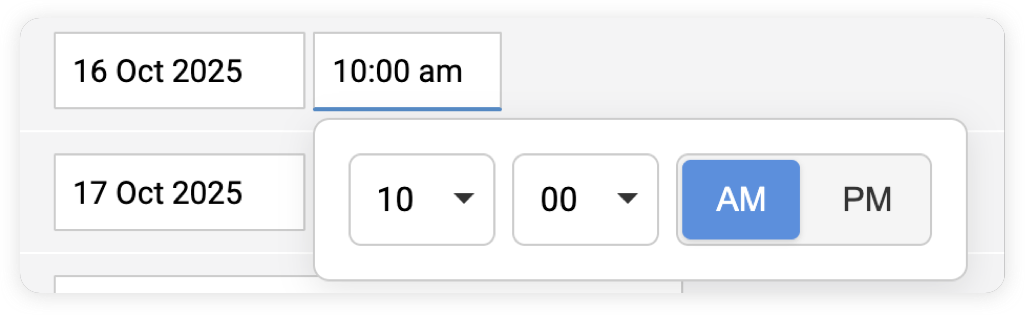
We’ve redesigned the time picker for faster, clearer input. Hours and minutes are now selected separately with large controls, making it
easier to set times. Switch between AM and PM with a single tap and avoid long scrolling lists.
Other Quality-of-Life Improvements
- Changes Shortcut: All changes that have happened on your account can be viewed via Settings > Changes. We've also now added "Changes" buttons to the contact profile, page editor, web design editor, and e-mail message editor.
- Product Ordering Options: Product ordering options can now be rearranged via drag-and-drop.
- Invoice Editing: You can now edit invoices directly in admin.
- Domain Without DNS: Domains can now be parked and verified without DNS setup, allowing easier verification of external domains for email sending.
- Link Checker: Oncord will now display an alert within the visual editor where you have links that don't quite match the linked text.
- Go Live Wizard with DKIM: The Go Live Wizard now includes DKIM setup instructions for custom DNS setups.
- Inline Editing for Attendees: Editing attendees now has the ability to modify or add new contacts inline without having to create the contact elsewhere
- Fulfillment Emails: Shipping fulfillment forms now include a dropdown for quickly selecting relevant company or contact emails.
-
Text Selection Improvements: Text selection in the editor is now smoother. Word snapping only occurs during quick selections, and resize overlays stay hidden while selecting text for a cleaner editing experience.
-
If / Else Tags Improvements: If / Else Tags Improvements are now handled through the toolbar system. Clicking the tabs shows or hides the relevant logic branch, and you can expand all when needed. When you select a branch, the source view automatically displays the corresponding section, keeping the workflow clear and consistent.
-
Improved Form Notification Delivery: If a form notification fails SPF checks, the system will now automatically send it using a noreply@theirsslsvc.com domain.
-
Improved Help Tooltips: Help text in the left panel now appears as a full tooltip and supports BBCode formatting from reflection comments. Help icons are displayed directly beside each control label, making it clearer which help text applies, especially when working with nested controls.
Knowledge Base, Courses & Resources
We've further extended the Help Articles section of our Learning Center with some new content:
New Tutorials & Videos
Expanded Help Articles
We’ve added over 50 new and updated help articles, making the Oncord Knowledge Base more complete and easier to navigate than ever.
Oncord Developer Updates
We’ve made several improvements for developers, enhancing visibility, performance, and social media integration reliability. We've also completed a comprehensive review of Oncord's Developer Documentation.
Context Aware Rendering Errors
Page rendering is now more resilient when errors occur. Instead of a single error
breaking the entire page, Oncord now captures errors during initialization and rendering and displays them directly where the issue
happens. The rest of the page continues to render normally.
These errors keep their full context and link straight back to the editor, making it faster to identify the root cause and fix issues without losing the whole page.
Added "Change made at /url/" to Change Logs
Change logs will now show the URL where a change was made. As an example - if a contact was changed by submitting a form, you'll now see the
URL where that form resides.
Improved Product and Post Export
We've improved the ability to export Product and Post data from Oncord.
Improved Account Restoration
We've made some improvements to our internal system for restoring terminated Oncord accounts. This means a faster turnaround time when our
team needs to restore an Oncord account for you.
Social Media Integrations
Oncord's social media integrations have been re-written to improve Oauth flows and renewal of authentication tokens.
Invalid Form Field IDs
An error will now show in the editor when field IDs contain invalid characters.
Optimized Variable Evaluation
logic:variable now defers evaluation until its value is actually needed, improving performance and reducing
unnecessary processing. Once evaluated, the value is cached automatically. In data tables and repeaters, the system forces evaluation per
row to ensure each row locks in the correct value.
Stripe Terminal Support
Support has been added for Stripe Terminal payments, allowing Stripe users to connect their terminals through the Stripe dashboard and use
them for payments within Admin Manual Sales.
Developer Resources
New Dev Tutorials:
- Shopping Cart PHP Algorithms
- Adding or Removing a Client From Your Agency Portal
- Filtering Blog Posts by Category with AJAX
Updated Dev Tutorials:
- Adding Contacts to Groups
- Breadcrumb Navigation
- Rotating Image Banners
- Populating Rotators with Posts
- Closing an Oncord Account on Behalf of a Client
- Recurring Donation Forms
- Help a Client Login to their Oncord Dashboard



Leave a Comment