
-
Website
-
3min Explainer Walkthrough

- Generate a Design
-
Page Management

-
Page Editing

-
Form Builder

- Updating Your Navigation Menu
- Creating Page Redirectors
- Posts Management
-
Search Engine Optimization (SEO)

- Setting Up Google Marketing Tools
- Setting Up Meta Pixel & E-commerce Tracking
- Setting Up Microsoft Marketing Tools
- Setting Up Reddit Pixel and E-commerce Tracking
- Setting Up Linkedin Insight Tag
- Optimizing Images For Web
-
Analytics

- Third Party Embed Code
- Special Files
- Setting Up OpenAI Ads Manager
-
3min Explainer Walkthrough
- Contacts
- Marketing
- Commerce
- Apps
- Settings and Config











Looking Up Your Domain Registration Details
You can look up the public registration details of any domain by performing a WHOIS lookup. This is useful when troubleshooting, when going live with a website, or when confirming your details are accurate and up to date.
These instructions are aimed at helping you perform a lookup your domain registration details, which is often required when troubleshooting issues, when going live with your website, or to confirm your details are accurate and up-to-date.
About Domain Registrars
A domain registrar is a company responsible for registering or renewing domain names on behalf of clients.
When you register a domain name, your registrar provides login details to a dashboard where you can manage domain settings, including renewals, billing details, and name servers.
Before You Begin
Check your billing records first. Your registrar is usually whoever you bought the domain from, so searching your email for a registration, renewal or transfer invoice is often the quickest answer.
Important: Be careful looking for this billing email. Fake renewal notices are common, and scammers harvest contact details from public registration records to make them look convincing. If an email looks like a renewal reminder but you don't recognise the sender, treat a WHOIS lookup as the way to verify who actually holds your registration.
Where to Perform a WHOIS Lookup
The organisation providing the lookup service depends on your domain name type.
| Domain | WHOIS Lookup |
|---|---|
| .com, .net, .org, and other generic domains | ICANN |
| .au | auDA |
| .ca |
CIRA |
| .fr |
AFNIC |
| .nz | Domain Name Commission NZ |
| .uk | Nominet |
If your domain isn't listed above, you can find a more exhaustive list on the Internet
Assigned Numbers Authority (IANA) website.
Interpreting a WHOIS Lookup
The WHOIS lookup service returns a list of details about your domain.
Registrar: The company responsible for registering or renewing the domain name. Domain sellers often operate as a reseller of a larger wholesale provider, so the company listed here may be a wholesaler rather than the company you dealt with directly. Some registrars also operate under several brands, so the name may not match what you recognise.
Registrar URL: The registrar's website. This is occasionally a contact enquiry form rather than a homepage.
Reseller: If the registrar has supplied it, the name of the company that sold you the domain. This field is often blank, but it's worth checking before working through the steps below.
Domain Status: Shows whether the domain is active, locked, or has a problem. Codes ending in "Prohibited", such as clientTransferProhibited or serverRenewProhibited, are routine locks and don't indicate a fault. The codes to look for are usually clientHold, serverHold, inactive, redemptionPeriod and pendingDelete, which mean the domain has stopped resolving or is on its way out of the registry. Most results also provide a link to a detailed explanation of what each code means.
Name Servers: Identifies the provider hosting DNS for your domain (read more about the role of DNS). If you're hosting DNS with Oncord, this will be set to ns1.oncord.com etc.
Registrant: The person or organisation that holds the licence to use the domain name. Keep these details current: the registrant has ultimate control over the domain, and where an organisation is named, the organisation is treated as the legal holder rather than the individual. Some domain types allow registrant details to be hidden behind a privacy service, in which case you'll be directed to a contact form or need to get in touch with the registrar.
Domain Wholesalers and Resellers
Companies who sell domains often act as a reseller of a wholesale domain provider. Wholesale domain providers typically don't sell domain registration to the public - only to other providers acting as resellers. Resellers range from small IT providers and web agencies, to larger well-known providers.
This can make it difficult to identify the company responsible for providing your domain registration. If the Reseller field in a WHOIS lookup is blank, you can:
- Contact the company listed as your domain registrar and ask who your reseller is, or
- Use the lookup tool provided by the wholesaler, listed below.
| Registrar | Reseller URL / Lookup URL |
|---|---|
| Instra, Domain Directors, TPP Wholesale | Find my provider |
| Synergy Wholesale | Partner lookup |
| CentralNic, or Key-Systems | Reseller lookup |
| Dreamscape Networks International, Web Address Registration Pty Ltd | Crazy Domains |
| Tucows | Provider search |
Good to know: Oncord is a reseller of TPP Wholesale. If you purchased your domain from Oncord, Instra will be listed
as your registrar.
Example: Suspended Domain Registration
If you don't pay your domain registration renewal, the registration is suspended. When this happens, your website, email and DNS go offline.
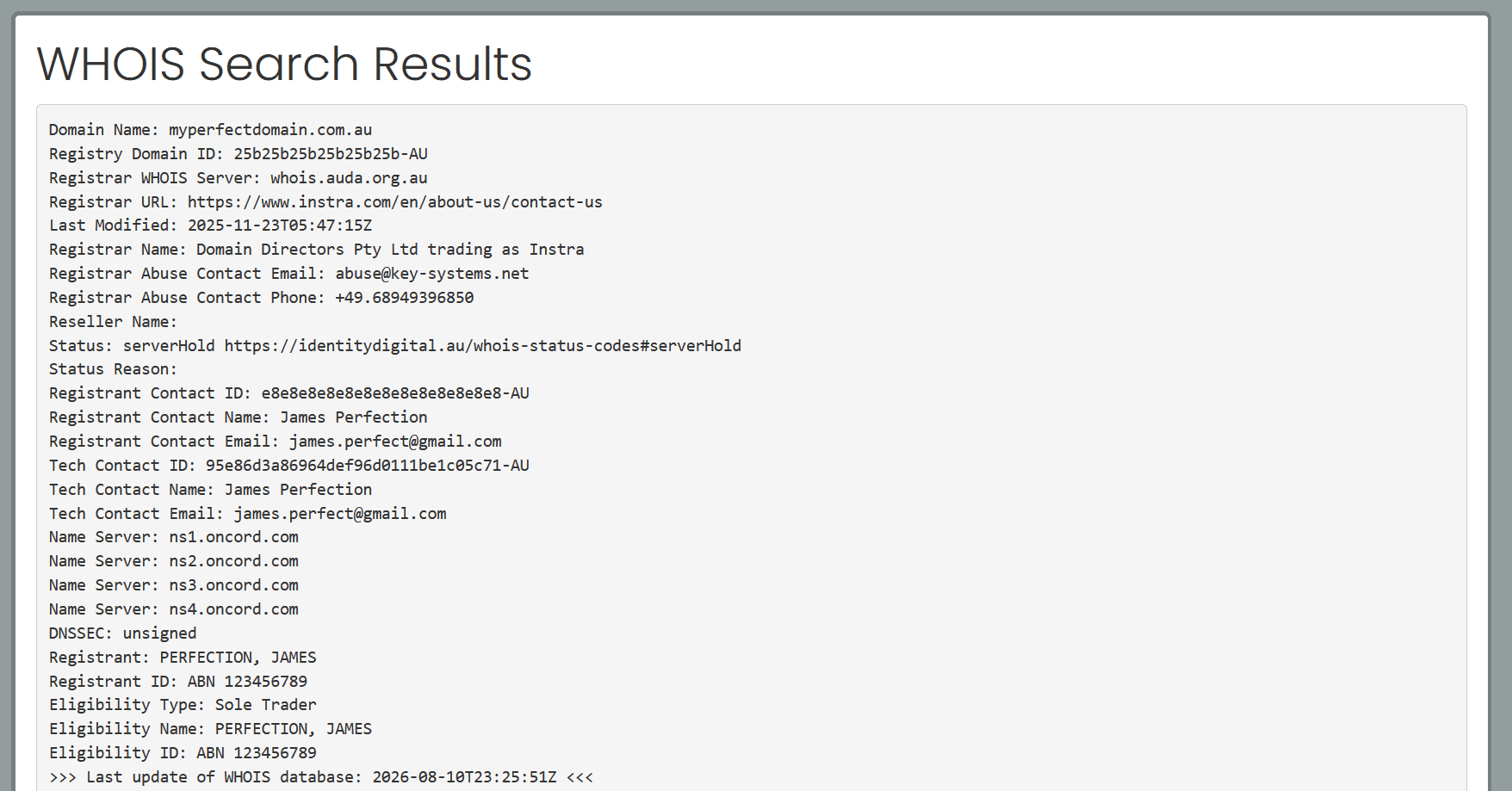
In this example, the domain name is myperfectdomain.com.au.
Perform a WHOIS Lookup
- The domain ends in .au, so use the auDA lookup service.
- Enter the domain name.
Check the domain status
The status shows serverHold, which means the domain is no longer active in the DNS. Following the link shown alongside the status confirms what the code means.
Identify the registrar
The registrar is listed as Domain Directors Pty Ltd trading as Instra, and no reseller is shown. From here you have two options:
- Go to the address shown in the "Registrar URL", and ask the registrar who your reseller is.
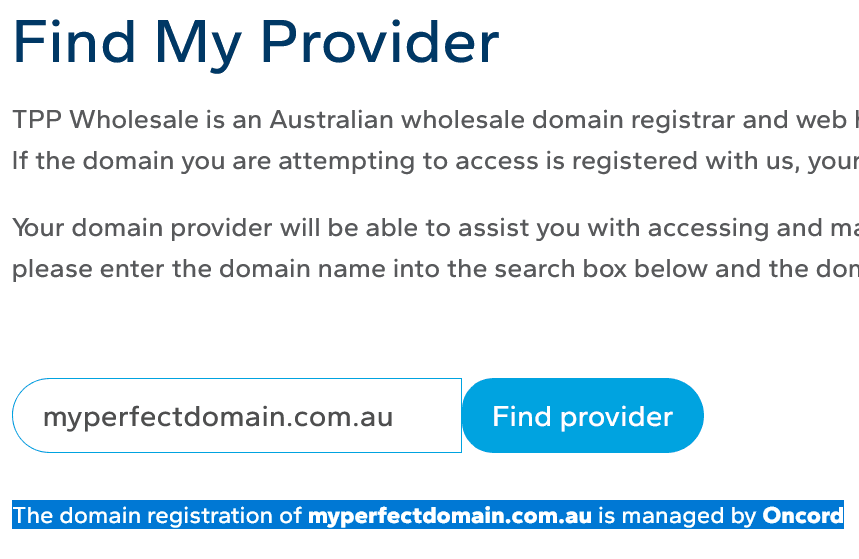
- As mentioned in the table above, we use the "Find my Provider" tool on the TPP Wholesale website, and can see the reseller is "Oncord".
The fix: Renew the registration
- Login to the Oncord Domain Console to renew the registration yourself, or
- Contact the Oncord support team and they'll assist with renewing your domain registration.