-
Website
-
3min Explainer Walkthrough

- Generate a Design
-
Page Management

-
Page Editing

-
Form Builder

- Updating Your Navigation Menu
- Creating Page Redirectors
- Posts Management
-
Search Engine Optimization (SEO)

- Setting Up Google Marketing Tools
- Setting Up Meta Pixel & E-commerce Tracking
- Setting Up Microsoft Marketing Tools
- Setting Up Reddit Pixel and E-commerce Tracking
- Setting Up Linkedin Insight Tag
- Optimizing Images For Web
-
Analytics

- Third Party Embed Code
- Special Files
-
3min Explainer Walkthrough
- Contacts
- Marketing
- Commerce
- Apps
- Settings and Config











- Website
-
-
3min Explainer Walkthrough
- Generate a Design
-
Page Management
-
Page Editing
-
Form Builder
- Updating Your Navigation Menu
- Creating Page Redirectors
- Posts Management
-
Search Engine Optimization (SEO)
- Setting Up Google Marketing Tools
- Setting Up Meta Pixel & E-commerce Tracking
- Setting Up Microsoft Marketing Tools
- Setting Up Reddit Pixel and E-commerce Tracking
- Setting Up Linkedin Insight Tag
- Optimizing Images For Web
-
Analytics
- Third Party Embed Code
- Special Files
-
3min Explainer Walkthrough
- Contacts
- Marketing
- Commerce
- Apps
- Settings and Config
Reddit Pixel Event Testing
Before configuring Reddit Pixel and conversion tracking, it is recommended to set up Reddit Pixel Event Testing first. Event testing helps confirm that your Reddit Pixel has been installed correctly, and configured events are being tracked as expected.
You can use event testing to verify:
- Whether the Reddit Pixel has been installed correctly.
- Which events are firing on your website.
- What metadata and advanced matching parameters are being passed.
- Whether any tracking issues have been detected.
There are two ways to test a Reddit Pixel:
Event Testing via Reddit Business
Open Event Testing
- Log in to your Reddit Business account.
- Open Events Manager from the left-hand menu.
- Click Event Testing from the left-hand menu.
- Enter your website URL into the Test a Pixel section.
- Click Open.
Your website will open in a new browser tab.
Note: Third-party cookies must be enabled in your browser settings for event testing to work correctly.
Trigger Events
- Browse the website in the new tab.
- Click buttons and perform actions you want to test.
Configured pixel events will appear in the Events Received window inside Reddit Event Testing.
Reddit Pixel Helper
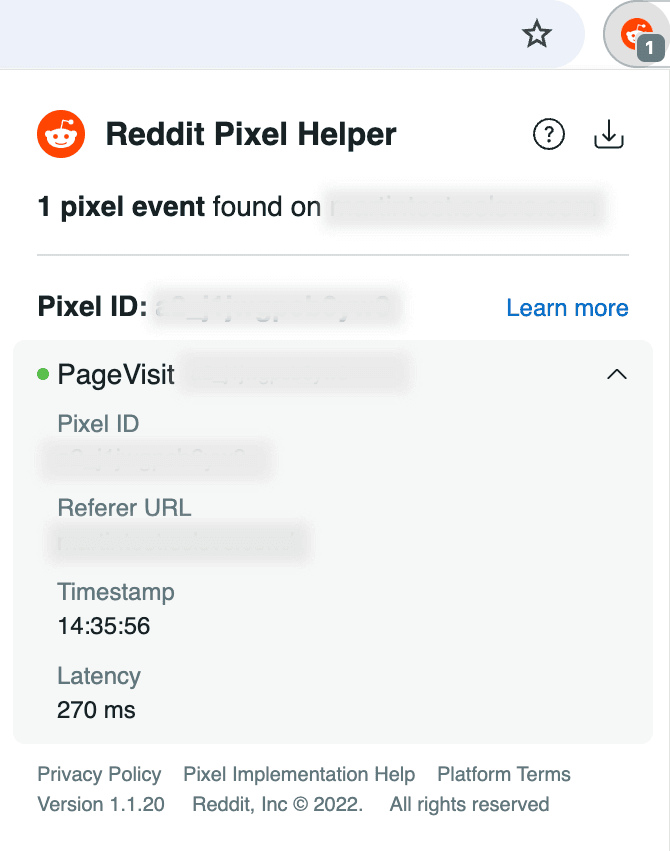
The Reddit Pixel Helper is a Chrome browser extension that checks websites for installed Reddit Pixel code and reports detected events.
Once installed, a Reddit Pixel Helper icon appears near the browser address bar.
- If a Reddit Pixel is detected, the icon becomes coloured.
- A badge displays the number of detected pixel events.
- If the icon remains grey, no Reddit Pixel was found on the page.
Install Reddit Pixel Helper
Before using the Reddit Pixel Helper, you must:
- Use the Google Chrome web browser.
- Install the Reddit Pixel Helper extension from the Chrome Web Store.
Test Your Website
After installing the extension:
- Open your website in Chrome.
- Click the Reddit Pixel Helper icon near the address bar.
The popup window will display:
- Which Reddit Pixels were detected.
- Which pixel events were triggered.
- Whether the events loaded successfully.
- Any detected tracking issues.